
Key takeaways
- Shopify is a hosted platform you rent by the month; WooCommerce is free software you run on your own WordPress hosting.
- Choose Shopify if you want to sell quickly and never think about servers, updates or security.
- Choose WooCommerce if you already run WordPress, want full control, or sell in ways Shopify's apps don't cover.
- Compare the total cost over two to three years — plan fees, transaction fees, apps or plugins, hosting and upkeep — not the first month.
On this page
Short answer: choose Shopify if you want to start selling quickly and never deal with hosting, updates or security. Choose WooCommerce if you already run WordPress, want complete control over your store, or need something Shopify can only do through a stack of paid apps.
Both are good platforms that run millions of stores. The right one depends on how you sell and who will look after the store once it's live.
What is the difference between Shopify and WooCommerce?
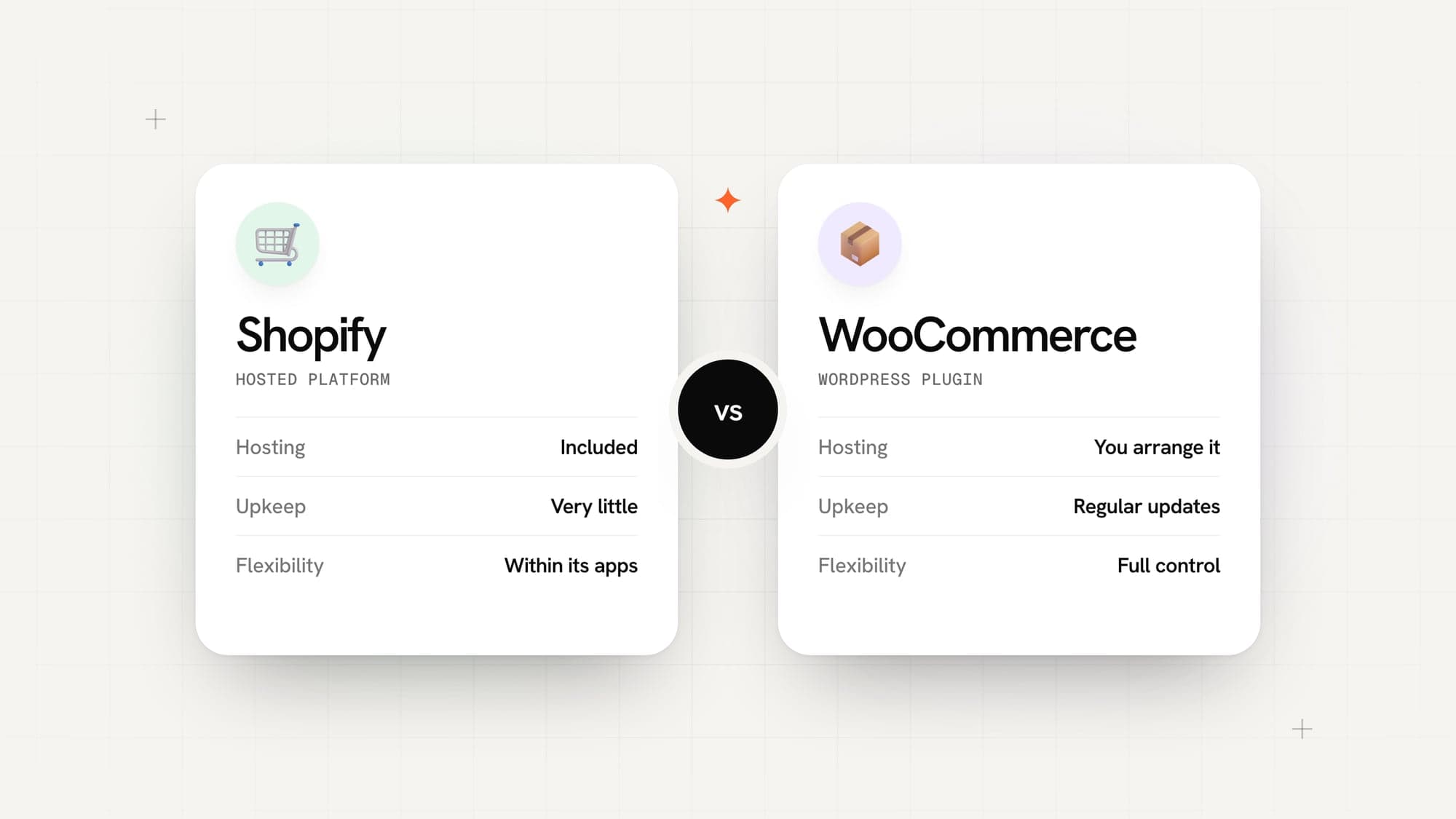
Shopify is a hosted platform. You pay a monthly plan, and Shopify runs the servers, security, checkout and updates. You add features through its app store.
WooCommerce is free, open-source software that turns a WordPress site into a store. You choose your own hosting, install the plugins you need, and you — or your developer — keep everything updated.
The simplest way to think about it: Shopify is renting a fully serviced shop. WooCommerce is owning the building.
Shopify vs WooCommerce at a glance
| Compared on | Shopify | WooCommerce |
|---|---|---|
| What it is | Hosted, monthly subscription | Free plugin for WordPress |
| Hosting and security | Included | You arrange and maintain it |
| Getting started | Fast — sign up and add products | Needs hosting, WordPress and setup |
| Monthly cost | A monthly plan fee, plus any paid apps | Hosting, plus any paid plugins |
| Transaction fees | None with Shopify Payments; an extra fee on other gateways | None from WooCommerce; your payment gateway charges its own |
| Flexibility | High, within Shopify's rules and apps | Almost unlimited — you control the code |
| Upkeep | Very little | Regular updates, backups and security checks |
| Best for | Brands that want to sell, not manage software | Teams on WordPress, or stores with unusual needs |
Plan fees change and differ by country, so check Shopify's current plans for your country before you decide.
When is Shopify the better choice?
- You want to launch quickly. A good Shopify store can be live in days, not weeks.
- Nobody on your team wants to manage servers. Hosting, uptime, security and checkout are Shopify's job.
- You sell standard products. Physical goods with sizes, colours and stock levels are exactly what Shopify is built for.
- You want a checkout people already trust. Shopify's checkout is fast and familiar to shoppers.
The trade-off is control. You work within Shopify's structure, and specialised features often mean monthly app fees that add up.
When is WooCommerce the better choice?
- Your website already runs on WordPress. Adding a store to the same site keeps your content and products in one place.
- You need full control. Custom product types, unusual pricing rules or deep integrations are easier when you own the code.
- You want to avoid platform transaction fees. WooCommerce doesn't take a cut; only your payment gateway charges.
- You have someone to look after it. WooCommerce needs regular updates, backups and security checks.
The trade-off is responsibility. A WooCommerce store that nobody maintains gets slow, and eventually becomes a security risk.
Is there a third option?
Yes. Some stores outgrow both and use a custom or headless build: a front end designed and coded for the brand, connected to a commerce engine and payment gateways like Stripe or Razorpay. It costs more to build, but gives the fastest pages and complete freedom over the design and checkout.
It makes sense when the store has thousands of products, complex rules, or a brand experience neither platform can deliver.
How do you choose for your store?
Answer these four questions:
- Who will run the store day to day? If it's you and you're not technical, lean Shopify.
- Are you already on WordPress? If yes, WooCommerce keeps everything together.
- How unusual is what you sell? The more custom the rules, the more WooCommerce or a custom build makes sense.
- What will it cost over three years? Price both options with the apps or plugins you actually need.
If the answers still point both ways, that's normal — tell a developer what you sell and how you work, and ask them to explain their recommendation. It should be about your store, not about the platform they prefer to build on.
Common questions
Is Shopify cheaper than WooCommerce?
Not always. WooCommerce itself is free, but you pay for hosting, premium plugins and someone to keep it updated. Shopify charges a monthly plan, plus transaction fees if you don't use Shopify Payments. Compare both over two or three years.
Which is better for SEO, Shopify or WooCommerce?
Both can rank well. What matters more is a fast store, clear product pages, good category structure and real content. WooCommerce gives more control over the technical details; Shopify handles most of the basics for you.
Can I move from WooCommerce to Shopify later?
Yes. Products, customers and order history can be moved, and redirects keep your old product URLs working so you don't lose search rankings.
Do I need a developer for Shopify?
Not to start selling. You need one when you want a design that is truly yours, custom features, or integrations with your other systems.
Sources

Written by
Naitik AgrawalFounder & CEO, WebSoln Labs
Founded WebSoln Labs and runs it end to end — the first conversation with a client, the scope, and the standard every build has to clear before it ships. Co-founder of StillYours, a home and property inspection company in Bengaluru. Also built Sippera, which has partnered on hackathons and tech events — including ones with Claude, CloudxAI and PW IOI.