
Key takeaways
- Measure first: PageSpeed Insights shows both lab tests and real visitors' data, page by page.
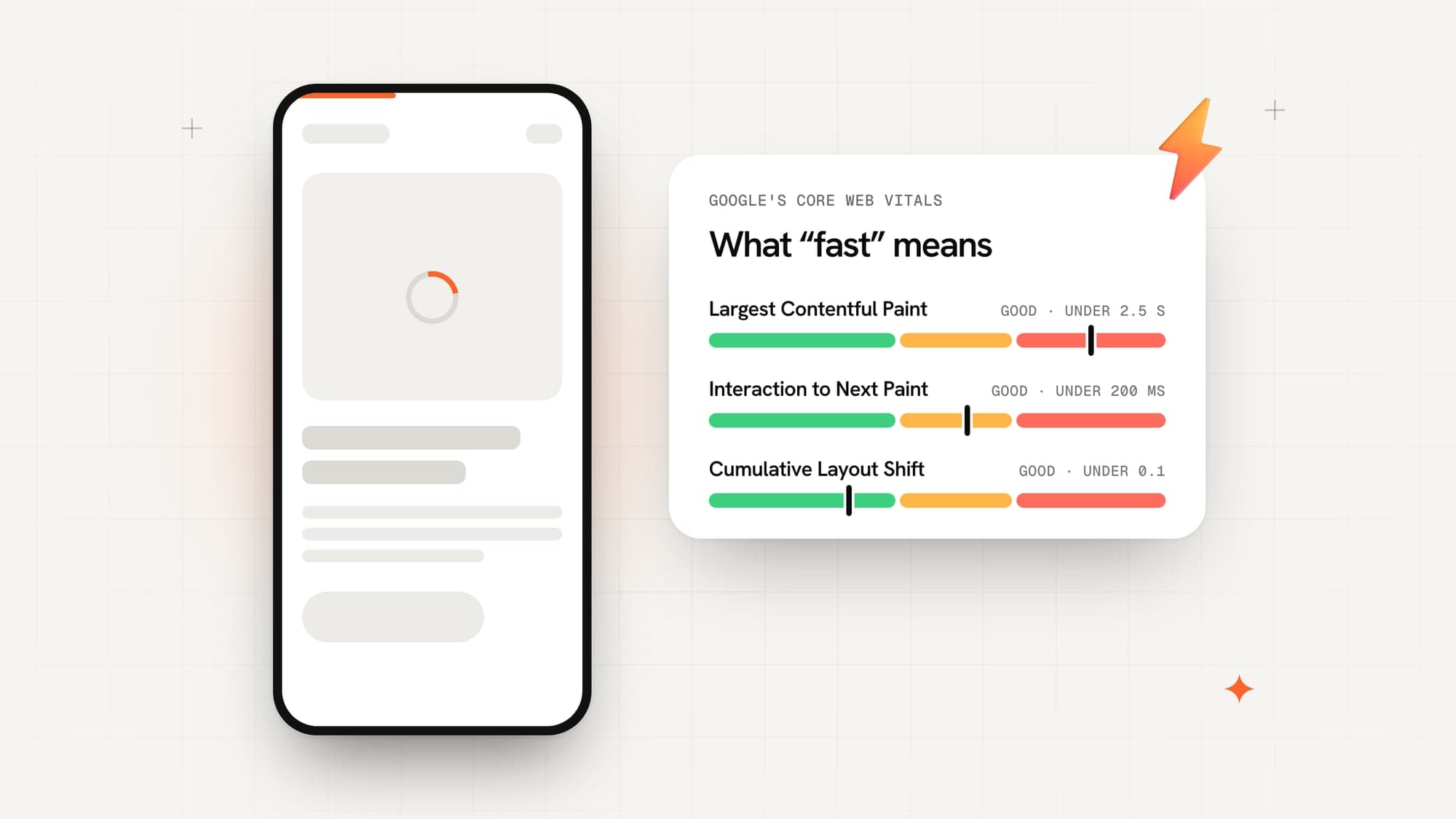
- Google's 'good' thresholds are a Largest Contentful Paint within 2.5 seconds, Interaction to Next Paint within 200 ms and Cumulative Layout Shift under 0.1.
- Oversized images, too much JavaScript and third-party scripts cause most slow pages.
- Fix causes, not symptoms: a caching plugin cannot rescue a page that downloads 10 MB of images.
- When a theme or page builder is the problem, a rebuild can cost less than patching it.
On this page
- 01How do you measure website speed properly?
- 021. Are your images too big?
- 032. Is the page loading JavaScript it doesn't use?
- 043. Is a page builder or heavy theme the problem?
- 054. How many third-party scripts are you running?
- 065. Are your fonts slowing down the text?
- 076. Is your hosting fast enough?
- 087. Is anything cached?
- 098. Does the layout jump while the page loads?
- 109. Is the first screen trying to do too much?
- 11When should you rebuild instead of fixing?
- 12Common questions
- 13Sources
Most slow websites are slow for the same handful of reasons: images that are far bigger than they need to be, more JavaScript than the page uses, third-party scripts nobody remembers adding, and hosting that's a long way from the people visiting. The good news is that each of these has a clear fix.
Here's how to find out what's slowing your site down, and the nine fixes that make the biggest difference.
How do you measure website speed properly?
Open PageSpeed Insights, paste in a page address, and run the test on mobile first — most visitors are on phones, and phones are where slow sites hurt most.
You'll see two kinds of numbers:
- Real-visitor data at the top, collected from Chrome users who visited the page over the last month. This is what Google uses.
- A lab test below it, which loads the page once in a simulated phone and lists what to fix.
Google's three Core Web Vitals, and what counts as good, are:
| Metric | What it measures | Good |
|---|---|---|
| Largest Contentful Paint (LCP) | How quickly the main content appears | 2.5 seconds or less |
| Interaction to Next Paint (INP) | How quickly the page responds to a tap or click | 200 ms or less |
| Cumulative Layout Shift (CLS) | How much the layout jumps while loading | Under 0.1 |
Test your most important pages — the homepage, your main service pages, a product page — not just one.
1. Are your images too big?
This is the most common problem we see. A photo straight from a phone camera can be 4–6 MB; on a website it rarely needs to be more than 200 KB.
- Resize images to the largest size they're actually shown at.
- Use modern formats. WebP and AVIF are far smaller than JPEG at the same quality. On our own portfolio screenshots, AVIF came out 25–40% smaller than WebP.
- Lazy-load images further down the page, so they only download when someone scrolls to them.
- Never lazy-load the hero image — it's usually what Largest Contentful Paint measures.
2. Is the page loading JavaScript it doesn't use?
Every script has to be downloaded, read and run before the page responds properly. Sliders, animation libraries, old tracking code and plugins that are installed site-wide but used on one page all add up.
Remove what you don't use, load page-specific scripts only on those pages, and defer anything that isn't needed for the first screen.
3. Is a page builder or heavy theme the problem?
Drag-and-drop builders and do-everything themes are convenient, but they often ship the code for every feature on every page. If PageSpeed lists dozens of CSS and JavaScript files from your theme, this is likely the cause.
You can trim it, but there's a limit to how fast a heavy theme gets. Sometimes rebuilding the key pages cleanly is cheaper than months of patching.
4. How many third-party scripts are you running?
Chat widgets, heatmaps, multiple analytics tools, ad pixels, embedded social feeds and review widgets all load from other companies' servers — and you can't control how fast those are.
List every one, ask whether it's still earning its place, and remove the rest. Load the ones you keep after the main content.
5. Are your fonts slowing down the text?
Custom fonts are a common hidden delay: the browser waits for the font file before showing text.
- Use one or two font families, and only the weights you need.
- Serve modern font files (WOFF2) from your own domain where possible.
- Use
font-display: swap, so text appears immediately and switches to your font when it arrives.
6. Is your hosting fast enough?
If the server takes a long time to send the first byte, everything after it is delayed. Cheap shared hosting, a server on another continent from your visitors, or a slow database are the usual causes.
A CDN (content delivery network) serves your files from locations close to each visitor, which helps a lot when your customers are spread across countries.
7. Is anything cached?
Without caching, the server builds every page from scratch for every visitor. Page caching, browser caching for images and files, and serving pre-built static pages where possible all cut load times sharply — especially on WordPress.
8. Does the layout jump while the page loads?
That's Cumulative Layout Shift. It usually comes from images without fixed dimensions, banners or cookie bars that push content down, ads, and fonts that change size when they load.
Give every image and embed its width and height, reserve space for anything that appears late, and avoid inserting content above what the visitor is already reading.
9. Is the first screen trying to do too much?
Auto-playing background videos, image sliders and big animations on the hero section are some of the heaviest things a page can load — right at the moment speed matters most.
A single well-optimised image with a clear headline usually loads faster and converts better.
When should you rebuild instead of fixing?
Fix the site you have when the problems are images, scripts, caching or hosting — they're usually quick wins. Consider a rebuild when the theme or builder itself is the bottleneck, when every fix breaks something else, or when the site needs a redesign anyway.
If you rebuild, keep your URLs or redirect them properly, so the rankings your current pages have earned carry over to the new site.
Common questions
How do I check my website speed?
Paste the page address into Google's PageSpeed Insights. Look at the real-visitor data at the top first, then the lab test below it, which lists what to fix. Test your most important pages, not only the homepage.
What is a good website loading time?
Google's guidance is that the main content should appear within 2.5 seconds (Largest Contentful Paint), the page should respond to taps within 200 milliseconds, and the layout shouldn't jump around (a Cumulative Layout Shift under 0.1).
Does website speed affect Google rankings?
Page experience, including Core Web Vitals, is one of the things Google's systems look at. Speed won't outrank better content on its own, but a slow site loses visitors before they read anything.
Will a caching plugin fix my slow website?
It helps with server response time, but it can't fix oversized images, heavy scripts or a bloated theme. Find out what is slow first, then fix that.
Sources

Written by
Naitik AgrawalFounder & CEO, WebSoln Labs
Founded WebSoln Labs and runs it end to end — the first conversation with a client, the scope, and the standard every build has to clear before it ships. Co-founder of StillYours, a home and property inspection company in Bengaluru. Also built Sippera, which has partnered on hackathons and tech events — including ones with Claude, CloudxAI and PW IOI.